How to Share Your Gemini-Created App with the World
Built something with Gemini? Here's the easiest way to share it with friends, family, or the entire internet—no coding knowledge required.
You Made Something! Now What?
You asked Gemini to build you something—maybe a calculator, a fun quiz, a productivity tool, or a little game. You can see it working right there in your browser. It's exactly what you wanted!
But now you're thinking: "How do I share this with my friends? How do I let other people use it?"
That's exactly what this guide is for.
The Problem: Your App Lives in a Bubble
When you create something with Gemini, it only exists in that moment—in your browser, on your computer. If you close the tab, it's gone. If you want someone else to use it, you'd have to send them the file and explain how to open it.
That's not very shareable.
What you really want is a link you can text to a friend, post on social media, or share anywhere. Something like gapp.so/my-cool-app.
The Solution: Publish on gapp.so
gapp.so is built for exactly this. It takes what you created and gives it:
- A shareable link anyone can access
- A nice landing page that explains what your app does
- A spot in our gallery where new people can discover it
And it takes about 2 minutes.
Step-by-Step: Sharing Your Gemini Creation
Step 1: Save What Gemini Made
In Google AI Studio, when you see your app working:
- Click the "Code" tab at the top of the panel (next to "Preview") to see your files
- Click the download icon (↓) in the top-right corner of the code panel
- Save the file to your computer (it usually saves as an HTML file)
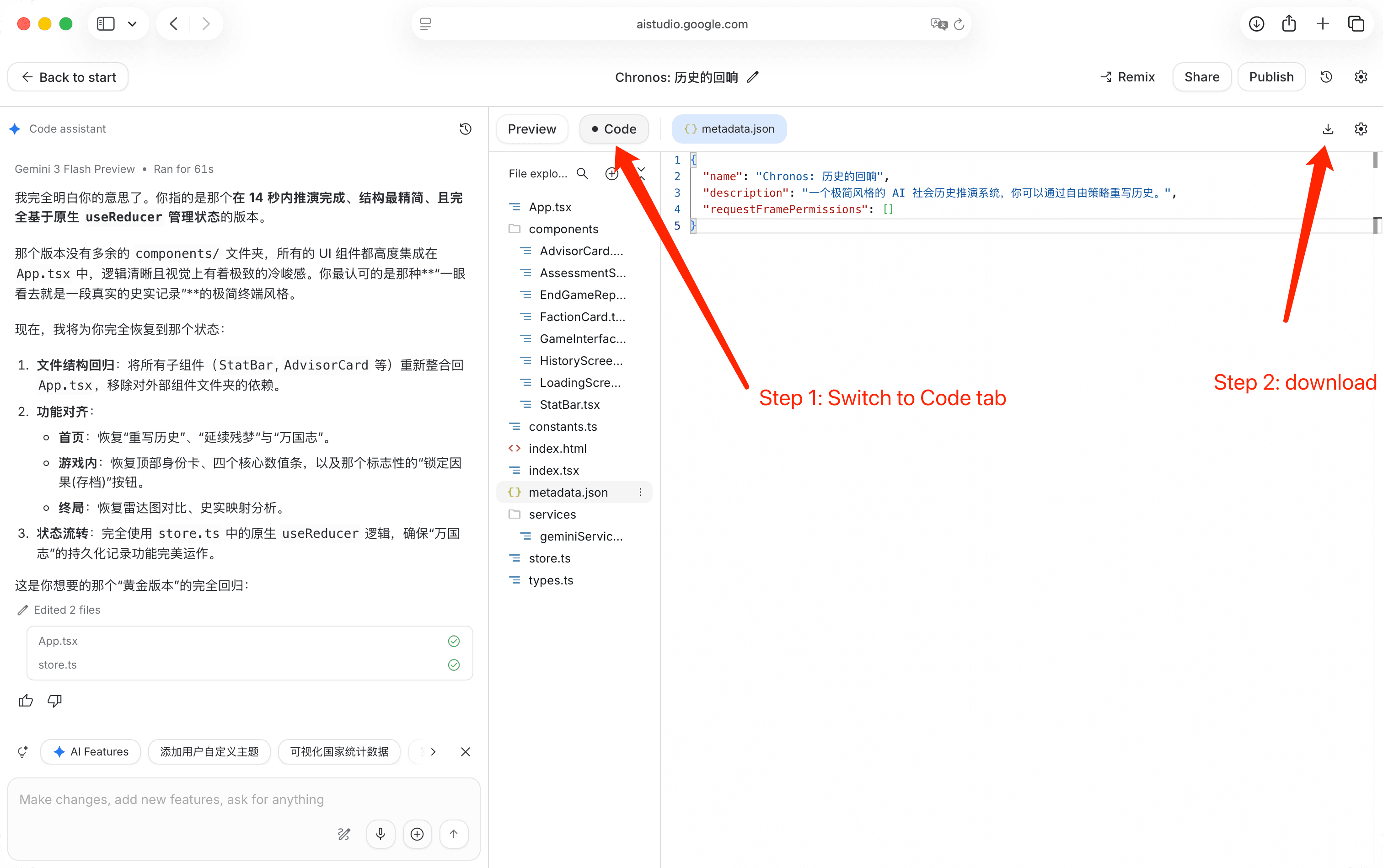
Don't worry about what's inside the file—you don't need to understand it.
Step 2: Go to gapp.so/submit
Open gapp.so/submit in a new tab.
Step 3: Upload Your File
- Click "Upload" or drag your saved file into the upload area
- The file will upload in a few seconds
Step 4: Add Some Details
Fill in the basics about your app:
- Name: What should people call it? Something short and memorable.
- Description: What does it do? Write 1-2 sentences. Tip: You can ask Gemini to write this for you!
- Category: Pick the best fit (Productivity, Learning, Games, etc.)
Step 5: Publish!
Click the Publish button. Done!
You'll get a link like gapp.so/your-app-name that you can share anywhere.
Tips for Making Your App Stand Out
Give It a Good Name
Instead of: "My App" or "Untitled"
Try: "Quick Budget Calculator" or "Daily Mood Tracker"
Good names tell people what to expect.
Write a Helpful Description
Your description appears when people find your app. Tell them:
- What it does
- Who it's for
- Why they might like it
Example: "Track your daily water intake with this simple, colorful tracker. Set your goal and watch the glass fill up as you drink throughout the day."
Add a Cover Image
Apps with images get way more clicks. You can:
- Take a screenshot of your app
- Ask Gemini or another AI to create a cover image
- Use any image that represents what your app does
Crop the final cover to an exact 3:4 portrait ratio before publishing.
Real Example: A Birthday Countdown
Let's say you asked Gemini: "Make a pretty countdown timer to my birthday on March 15th"
Saving it: Download the HTML file from Google AI Studio
Publishing it:
- Name: "Birthday Countdown"
- Description: "A beautiful countdown showing days, hours, minutes, and seconds until the big day. Confetti animation when time runs out!"
- Category: Utilities
Result: Your countdown is now at gapp.so/birthday-countdown and anyone with the link can see it!
What Happens After You Publish?
Once your app is live:
- Share the link - Text it, post it, email it—your app works on any device
- People can find it - Your app appears in our gallery for others to discover
- See who's using it - Check your dashboard to see views and usage
- Update anytime - Want to make changes? Just upload a new version
Frequently Asked Questions
Do I need to know how to code?
Nope! If Gemini made it for you, you can publish it. No coding knowledge needed.
Is it free?
Yes, publishing apps on gapp.so is free.
Can I make changes later?
Absolutely. Go to your dashboard and click "Edit" to update your app.
What if I want to delete it?
You can remove your app anytime from your dashboard.
Can my app save data?
Yes! Check out our State feature that lets your app remember things without any complicated setup.
Ready to share what you've made? Publish your app now and get your shareable link in minutes.